
Our Next.js builds kept running out of memory and webpack config was the reason.
Raising --max-old-space-size didn't help. A webpack config added by Sentry had quietly switched off the Next.js build worker, so compile memory was never released before linting and type checking.
For a long time, one of our Next.js projects failed to build more often than it passed. We deployed it on Vercel, on a build machine with 4 cores and 8 GB of RAM, which is plenty for an app of that size, and still the log kept ending the same way: the build ran out of memory. I later hit the same error on AWS Amplify.
That was the first clue. The host wasn't the problem. Next.js was doing exactly what our config told it to do.
We tried a lot of things. None of them worked until I found the real cause, and the fix turned out to be two lines in next.config.js.
What we saw
The failure always came late. Compilation finished, then the build moved on to linting and type checking, and that is where it died.
When I looked at memory, the numbers explained it:
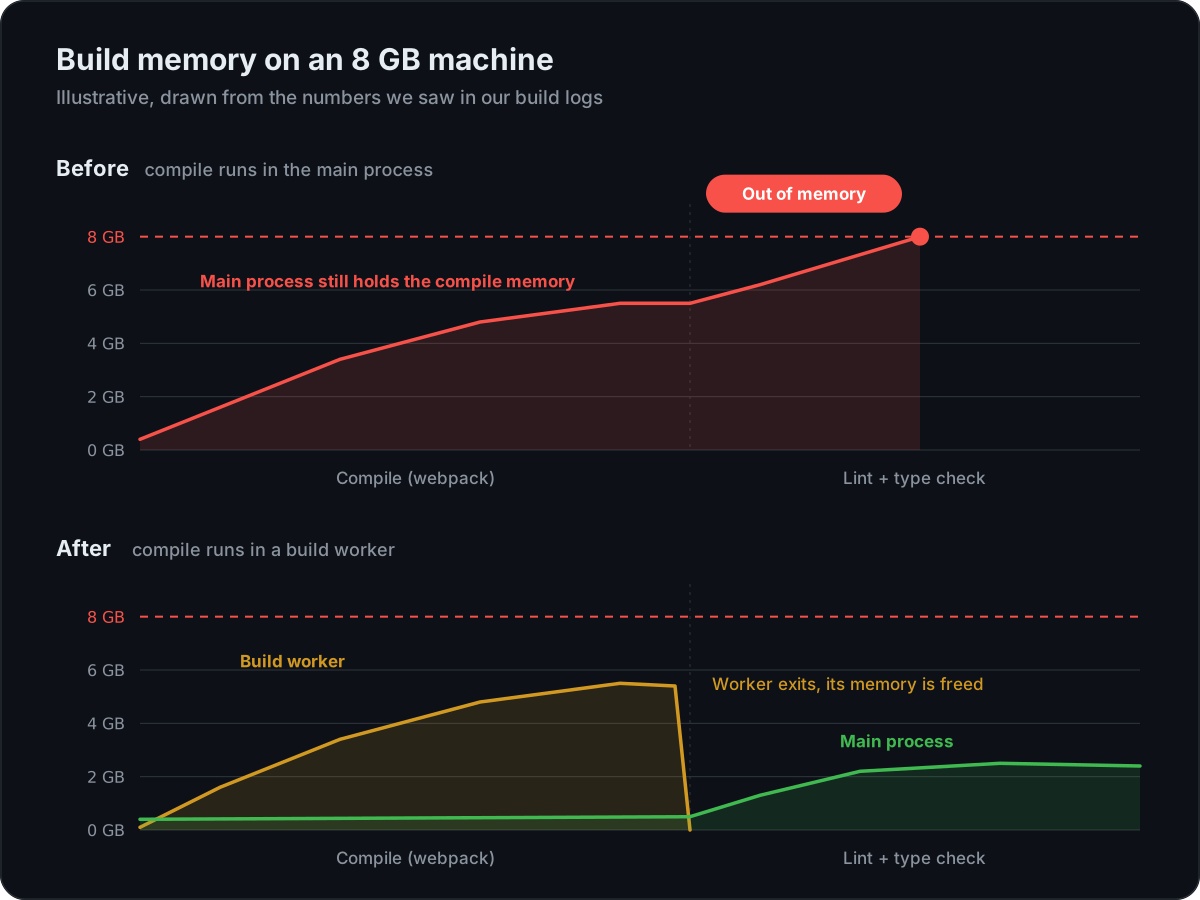
- Compiling the app with webpack peaked at about 5.5 GB.
- Linting and type checking needed another 1.8 to 2 GB on top of that.
Together that is more than an 8 GB machine has. But that only matters if the compile step's memory is still being held when linting starts. Compilation was done by then, so why wasn't that memory released?
What we tried first
The first answer you find for this error is to give Node a bigger heap:
NODE_OPTIONS="--max-old-space-size=8192" next build
It didn't help, and looking back, it couldn't. --max-old-space-size raises the limit on how large Node's JavaScript heap may grow. It doesn't add RAM to the machine. On an 8 GB build machine, allowing an 8 GB heap only lets the process grow until the machine itself runs out.
We had also done what many teams do when builds are fragile: we kept linting switched off during builds so they would pass more often. That made failures rarer, but it isn't a fix. You give up a safety check to make room for a memory problem you haven't understood. This had happened on several of our projects, and each time the workaround was the same.
The cause: a webpack config we didn't write
Since Next.js 14.1, next build runs the webpack compilation in a separate Node.js worker by default. When compilation finishes, the worker exits and its memory goes back to the system before the next step starts.
There is one condition. From the Next.js memory usage guide:
This option is enabled by default if your application does not have a custom Webpack configuration starting in
v14.1.0.
In the Next.js build source, the decision is a single line:
const useBuildWorker =
  config.experimental.webpackBuildWorker ||
  (config.experimental.webpackBuildWorker === undefined && !config.webpack);
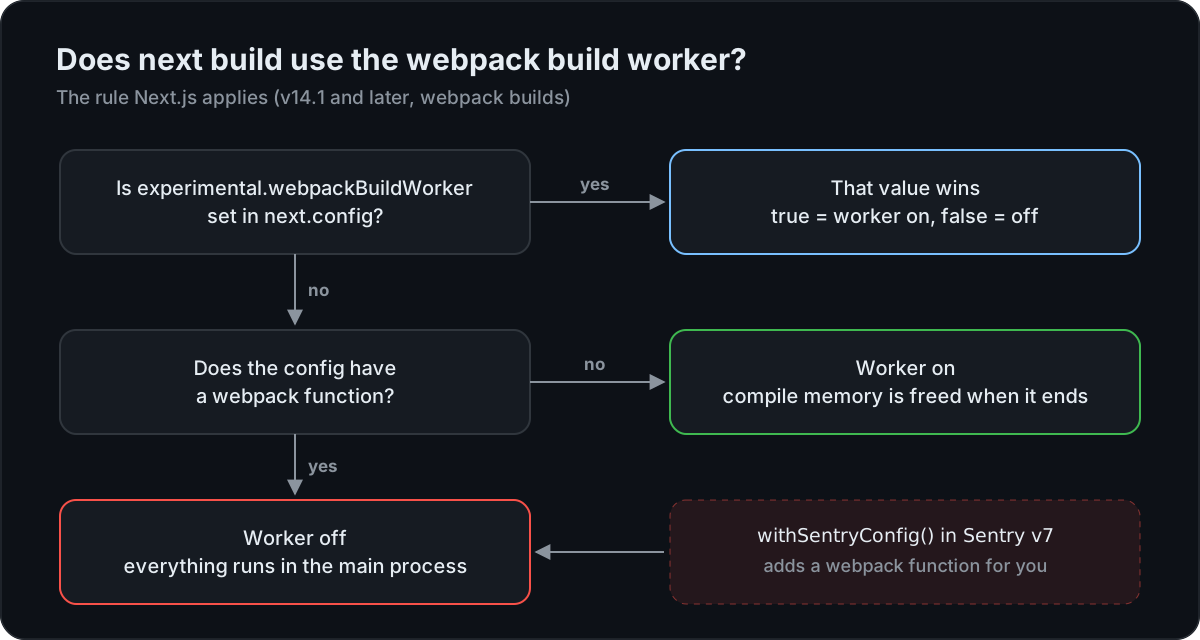
Our next.config.js didn't have a webpack function, or so it looked. But the config was wrapped in Sentry's withSentryConfig(). In version 7 of @sentry/nextjs, that wrapper returns your config with a webpack function added, so Sentry can hook its webpack plugin into the build. As far as Next.js was concerned, we had a custom webpack config.
So the build worker was off, and the whole compilation ran in the main build process. In our builds, that process kept the memory it used for compiling while it went on to lint and type check, and the two together crossed 8 GB.
The fix
Setting the option explicitly wins over the default check, whatever plugins add to the config:
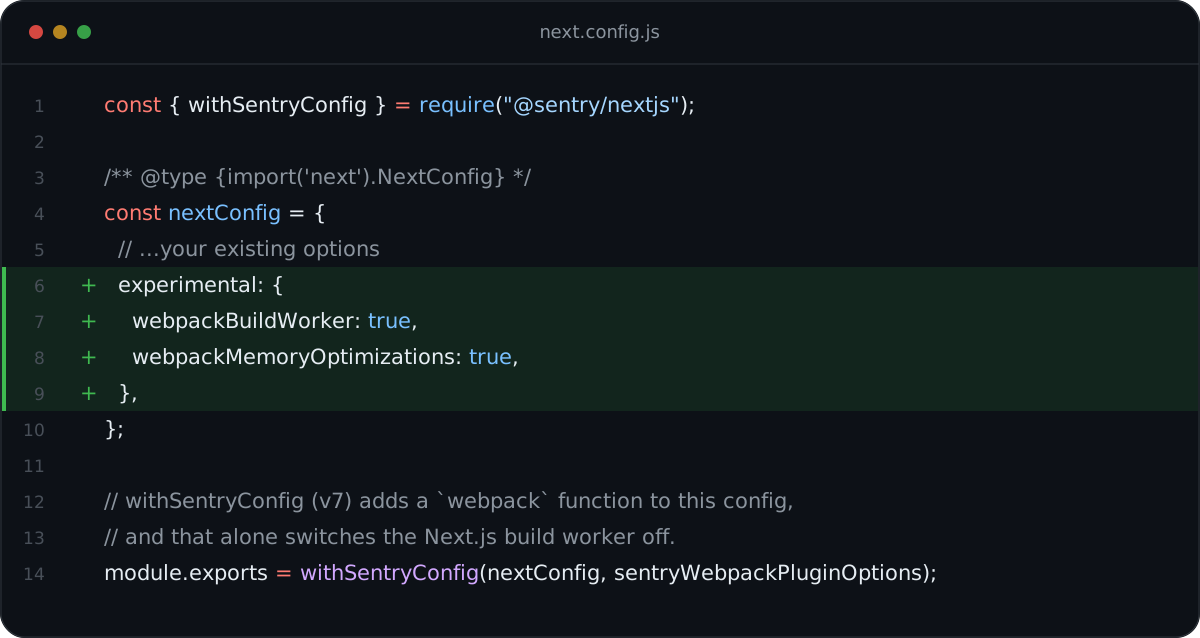
Here it is as text, ready to copy:
const { withSentryConfig } = require("@sentry/nextjs");

/** @type {import('next').NextConfig} */
const nextConfig = {
  // ...your existing options
  experimental: {
    webpackBuildWorker: true,
    webpackMemoryOptimizations: true,
  },
};

module.exports = withSentryConfig(nextConfig, sentryWebpackPluginOptions);
webpackBuildWorker: truemoves compilation back into the worker. When it finishes, its memory is released.webpackMemoryOptimizations: true(Next.js 15 and later) changes some webpack behaviour to lower peak memory, at the cost of slightly longer compiles. The docs call it experimental but low-risk. Note the plural name: Next.js warns about keys it doesn't recognise and ignores them.
Now compilation runs in the worker, the memory is freed as soon as it finishes, and linting and type checking start from a low baseline. The out-of-memory error is gone, and linting is back on in our builds.
Check your own project
-
Look for wrappers. Any
withSomething(nextConfig)innext.config.jsmay add awebpackfunction. Sentry's v7 wrapper always does. -
Ask Next.js what it sees. If your config exports an object, this prints
functionwhen a webpack config is present, which means the worker is off by default:node -e "console.log(typeof require('./next.config.js').webpack)" -
Watch memory during a build. Since Next.js 14.2,
next build --experimental-debug-memory-usageprints heap usage as the build runs. It doesn't work together with the build worker, so use it to confirm the problem before you turn the worker on. -
Test the build after the change. The docs note the worker "may not be compatible with all custom Webpack plugins". Sentry's worked for us, but run a full build and check your source maps still upload.
If you're on Next.js 16, next build uses Turbopack by default and no longer runs linting, so this applies when you build with webpack (next build --webpack).
What I took away
- A higher limit is not a fix. If memory should have been released and wasn't, giving the process more room only delays the crash.
- Wrappers change defaults. A plugin that edits your config can switch off behaviour you didn't know you relied on. It's worth reading what your config looks like after every wrapper has run.
- Turning off checks to get a green build hides the problem. The real fix let us turn linting back on.

Written by Ubaid Hussain, a senior frontend engineer who likes to travel, build and write things down.